
OpenClaw Subagents: Delegate Complex Tasks to Specialized AI Workers

When an AI assistant tries to do everything in one conversation — browse the web, write code, run deployments, process images — the context window fills up fast. When context overflows, sessions crash, work gets lost, and you end up SSHing into your server to figure out what happened.
OpenClaw's subagent system solves this. Instead of one AI doing everything, you delegate specific tasks to focused sub-workers. The main agent coordinates; subagents execute. It's the same model used by well-run teams everywhere.
This tutorial shows you how the subagent system works and how to use it effectively.
Why Subagents Matter
A multi-agent architecture prevents context overflow and enables parallel task execution
A single Claude session has a finite context window — currently around 200,000 tokens for Claude Sonnet and Opus. That sounds like a lot, but it fills up quickly when you're:
- Loading large files or codebases
- Taking multiple screenshots (each is thousands of tokens)
- Running long research tasks with many web searches
- Writing substantial content (blog posts, documentation, reports)
When the context fills, sessions become slower, more expensive, and eventually crash. The symptoms: weird truncated responses, forgotten context, errors you have to debug manually.
The fix is context isolation. Each subagent runs in its own fresh context, does its specific job, and returns only the relevant output to the main agent. The main agent never has to load all that raw work into its own context.
For related reading on multi-agent systems in general, see the multi-agent AI systems guide.
How OpenClaw Subagents Work
 Subagents are independent sessions with their own context, tools, and task scope
When the main OpenClaw agent spawns a subagent, it:
- Creates a new isolated session with a clean context
- Passes a task description (the "mission briefing")
- Optionally shares relevant files or context from the main session
- Waits for completion (or moves on and checks back later)
- Receives a concise summary of what was accomplished
The subagent has access to all the same tools — file operations, web browsing, code execution, messaging — but in an isolated environment. Its context overflow doesn't affect the main agent.
Subagents communicate back through their final response, which the main agent reads and acts on.
Step 1: Identify Tasks Worth Delegating
 Not all tasks need subagents — knowing when to delegate is half the skill
Good candidates for subagent delegation:
- Browser-heavy tasks — Research, screenshots, form filling. Each screenshot is large; isolate this work.
- Large file processing — Analyzing codebases, processing CSVs, summarizing long documents
- Content creation — Writing blog posts, generating reports, drafting emails
- Multi-step deployments — Build, test, deploy, verify sequences
- Parallel work — Tasks that can run simultaneously instead of sequentially
Keep in the main session:
- Quick lookups and single-step answers
- Tasks that require tight feedback loops with you
- Coordination and decision-making
- Anything that needs your direct input mid-task
The mental model: main agent = manager, subagents = specialized workers. Managers don't do all the work themselves.
Step 2: Write Clear Task Briefings
 A good task briefing prevents the subagent from drifting or asking unnecessary questions
The quality of your delegation is the quality of your briefing. A subagent can only do what you tell it to do. Vague instructions produce vague results.
A good task briefing has five parts:
1. Goal — What does success look like? "Research the top 5 open-source LLM inference servers and return a comparison table with: name, license, GPU support, throughput benchmarks, and community activity."
2. Scope — What's in bounds? "Focus only on servers that support quantized models. Ignore anything that requires proprietary cloud APIs."
3. Tools available — What can it use? "Use web search and the browser tool. You can read files in /workspace/research/ for prior context."
4. Output format — How should it return results? "Return a markdown table plus 2-3 sentence recommendation. No need to explain your research process."
5. Completion signal — How does it know it's done? "Task complete when you've compared at least 5 servers and provided a recommendation."
Step 3: Launch Your First Subagent
 Spawning a subagent in OpenClaw is a natural language instruction, not a configuration file
In OpenClaw, spawning a subagent is as natural as asking for help:
"Spawn a subagent to research the best self-hosted vector databases for storing AI embeddings. Compare at least 4 options by performance, ease of setup, and storage efficiency. Return a comparison table and a recommendation."
OpenClaw will create an isolated session, run the research, and return the summary to your main conversation. You don't have to manage the process — just read the result.
For longer tasks, you can tell it to run in background:
"Spawn a subagent in background to audit all blog posts in /workspace/clawist/content/posts/ for broken image paths. Return a list of affected files when done."
This lets you continue working in the main session while the subagent handles the tedious audit work independently.
Step 4: Chain Subagents for Complex Pipelines
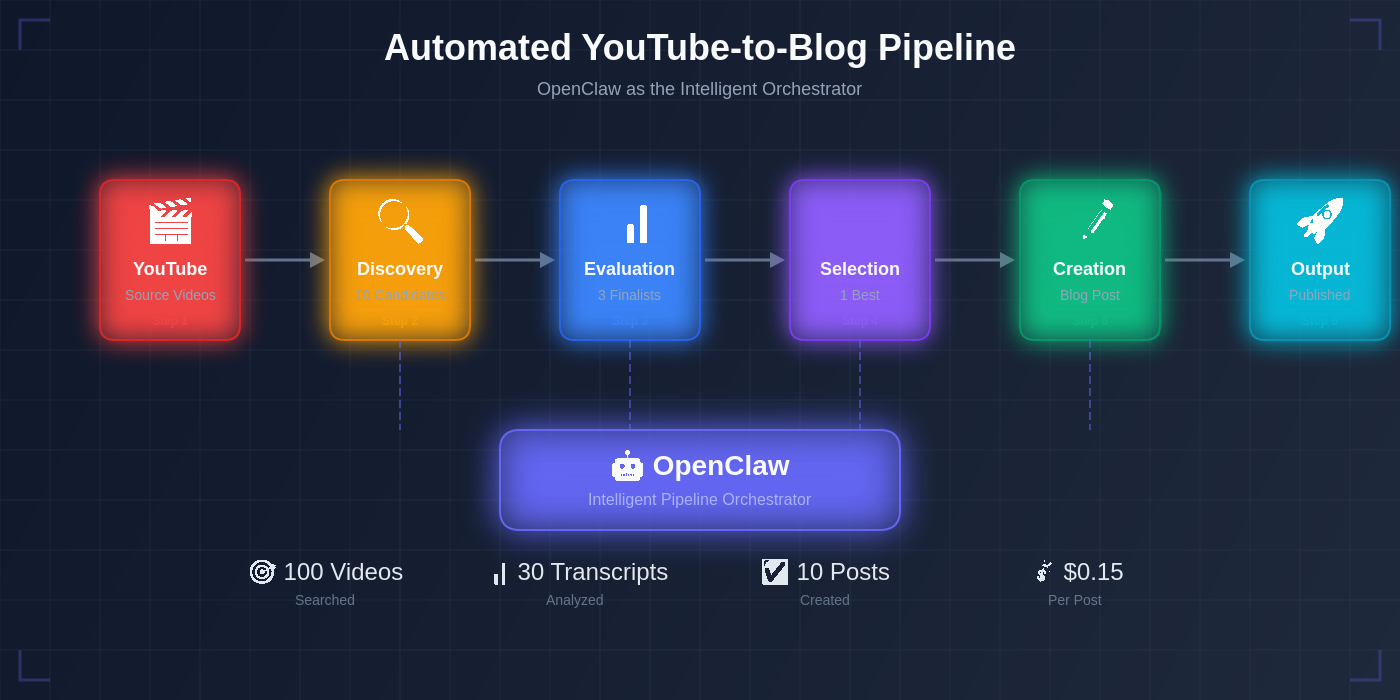 Chaining subagents creates powerful multi-step pipelines that can run autonomously
Advanced users chain multiple subagents to build autonomous pipelines. Each subagent handles one stage and passes results to the next.
Example: An automated blog post creation pipeline:
Main Agent
│
├── Subagent 1: Research
│   Task: Find top 5 AI trends this week, summarize each in 3 sentences
│   Output: Research notes file
│
├── Subagent 2: Write
│   Task: Read research notes, write 1,500-word blog post
│   Output: Draft MDX file
│
├── Subagent 3: Deploy
│   Task: Validate MDX, git commit, push, verify live URL
│   Output: Live URL + status report
│
└── Main Agent: Review and notify
    Task: Screenshot live post, verify quality, report to user
Each agent works independently and hands off only the essential output. The main agent coordinates but doesn't do the heavy work.
See the automated YouTube blog pipeline guide for a real-world example of this pattern.
Step 5: Handle Subagent Failures Gracefully
 Subagents can fail — good delegation anticipates this and builds in recovery
Subagents can fail. Web searches time out, deployments hit errors, files aren't where expected. Build failure handling into your delegation patterns:
Verify, don't trust. After a subagent reports "done," verify the output yourself before telling the user it's complete. A subagent saying it succeeded doesn't mean it succeeded.
Define fallback behavior. Tell subagents what to do when they hit a blocker: "If you can't access the URL, note it as unreachable and continue with the remaining items."
Set scope limits. "If this takes more than 15 minutes or 20 web searches, stop and report what you've found so far."
Read the return carefully. A subagent reporting "task complete" should include specifics. "I wrote the file to /workspace/output.md" is verifiable. "I completed the task" is not.
The OpenClaw cron automation guide covers similar reliability patterns for scheduled tasks.
Practical Delegation Patterns
 These patterns cover the most common subagent use cases — adapt them to your workflow
The Researcher Pattern: Send a subagent to gather raw information, synthesize it, and return a structured summary. The main agent then makes decisions based on the summary — not the raw research.
The Worker Pattern: Delegate a clearly defined task with measurable completion criteria. The subagent does the work; the main agent verifies and moves on.
The Auditor Pattern: Send a subagent to check a large set of items (files, URLs, records) against a set of criteria. It returns a list of issues, not the full audit log.
The Parallel Pattern: Spawn multiple subagents simultaneously for independent tasks. Research, writing, and deployment can all happen at the same time. Main agent collects results when all complete.
The Draft-Review Pattern: One subagent drafts; a second subagent reviews and critiques; main agent reads the review and applies or rejects suggestions. Produces higher quality output than a single-pass approach.
Conclusion
 Subagent delegation transforms your AI assistant from a single worker into a coordinated team
Subagents are the difference between an AI assistant that handles simple requests and one that manages genuinely complex workflows. The pattern is simple: main agent coordinates, subagents execute, everyone stays within their context limits.
Start with a single subagent delegation — pick a task that's been filling up your main context (a research job, a large file analysis, a multi-step deployment) and delegate it. Once you see how naturally it works, you'll start seeing subagent opportunities everywhere.
For more on building complex workflows, see the AI workflow automation guide and the self-hosted AI stack guide.
Frequently Asked Questions
How many subagents can run simultaneously? OpenClaw supports multiple concurrent subagents. Practical limits depend on your API rate limits and server resources. For intensive workloads, stagger launches or check your Claude API rate limiting settings.
Can a subagent spawn its own subagents? Yes. Subagents have the same capabilities as the main agent, including the ability to spawn further subagents. Use this sparingly to avoid deeply nested hierarchies that are hard to debug.
Do subagents have access to my memory files? By default, subagents can access your workspace directory, including memory files. You can restrict this in the task briefing by specifying which files the subagent should and shouldn't touch.
How do I debug a subagent that went wrong? Subagents write to the session log. Check the workspace's session history, or ask your main agent to review what the subagent did. Adding explicit logging instructions to the task briefing helps: "At each major step, log your action to /tmp/subagent-log.txt."
More Articles
The Ultimate OpenClaw AWS Setup Guide

The definitive guide to setting up OpenClaw on AWS. Includes spot instance configuration, cost optimization, and step-by-step instructions.
Building AI Workflows with Tool Chaining in OpenClaw
Master the art of chaining tools and function calls to build powerful multi-step AI automation workflows—from data extraction to content generation and deployment.
Cost Optimization Guide for Self-Hosted AI Assistants: Run Claude on a Budget
Practical strategies to reduce API costs for self-hosted AI assistants—smart model routing, caching, batching, and OpenClaw-specific optimizations to run Claude affordably.